
How to install unsigned drivers in Windows 8

Info: If you’re looking for a solution for Windows 10, read the article about installing unsigned drivers in Windows 10.
Meanwhile for me it’s almost impossible to live without Windows 8. I got used to the new interface and don’t want to miss it even for one day. Then, yesterday I detected a very unpleasant problem. Windows 8 just didn’t wanted to install a driver, because it was not signed. In the end it worked out. And this is how I did it.
Install unsigned driver with Windows 8
To install unsigned driver (driver which are not signed by Microsoft) in Windows 8, you have to reboot your system in a “special way” before.
Step 1:
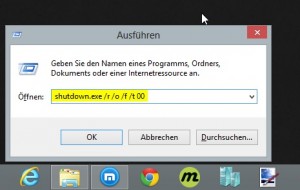
unsignierte_treiber_unter_windows8_installieren (1)
As soon as Windows 8 is ready, you need to start the Boot-Options-Menu. Therefore you need to press Win+R at the Windows 8 desktop, […]

Best of Web #8

best of web - runde 8And again a Monday. Besides the fact that Monday, as the beginning of the week, probably is one of the scariest days of the week, there’s a second thing that always takes place on Mondays: My “Best of Web” series.
Today, it is already the 8th episode and this time there is again a novelty. There is no video in addition to some interesting articles at the end this time, like every week, because nothing suitable has crossed my paths this week.
But everything remains the same. That means – there are a few more bits of web development, the C# world and of the subject of hardware hackers. And now, I hope you enjoy reading.
HDMI over IP Windows client

Best of Web #7

best of web - runde 7Today it is once again time for another round of “Best of Web”. This week I have a few more links on the hand, I would like to share with you. Overall, it comes back this week to some technical topics – good for geeks and nerds among you, rather poor for lovers of more “lighter fare”. Among others, today is about compilers, the history of Windows, some web design basics and a bit of image recognition in C#. I hope there is one or the other interesting article for everyone.
As always – who has more link tips, is hereby invited to send me these for one of the rounds of my “Best of Web” series. And now have fun with my recommendations of the week.
Quick introduction to compiler […]

20 Dropbox tools you should know

When it comes to online storage and sync, then Dropbox is my number 1 and because I’m pretty sure I’m not alone with this sight, below there is a collection of 20 tools which will help you to realize the full potential of your Dropbox.
 
 
dropplets
#1 – dropplets.com / Blog with Dropbox
With dropplets your Dropbox becomes a blogging platform. After the “installation” your Dropbox behaves like a web server.
New articles can be written in the easy to learn Markdown language and published by simply save them in your Dropbox. The whole thing is quick, easy, and also looks quite chic.
 
 
calepin
#2 – calepin.co / Publishing by Dropbox
Calepin.co is the second blog system in our listing. Also […]

Benchmark: strtotime() vs DateTime vs getTimestamp in PHP

Recently I wrote about how one can implement date comparison in PHP. In the article I presented two approaches. Firstly, using the strtotime() method and another with the DateTime class.
Then, in the comments on the german division of this blog, it was pointed out that the strtotime() variant is probably faster. Because I wasn’t sure about this, I decided to make a small performance test and share the results with you in this article.
How did I test the performance?

Since the question aims on strtotime() vs. DateTime, the DateTime class is contrary to the strtotime() function. So because DateTime class offers more functionality, I had first to create the DateTime object and then get the timestamp of it, because the strtotime function gives a timestamp as return value and I wanted to compare the time needed to generate the identical output.
As input I have taken a date without a custom time […]