
At home, my music comes from Spotify Premium, and most of my playback devices are Amazon Alexa devices.
I wanted my daughter to start her favorite songs without handling a phone or a screen. Tap an NFC card on the reader and the music starts: a kind of Toniebox, just built myself. The reader is a DIY build based on an ESP32 microcontroller and ESPHome Builder, following the adonno/tagreader template.
The obvious Home Assistant approach is the official Spotify integration plus media_player.play_media. That is not enough for a cold start, though. The integration can use play_media sensibly only when something is already playing. Starting a specific song, playlist or podcast from a stopped player is therefore not supported by this path. This is a limitation of the integration and its current media_player behavior, not a configuration mistake.
The solution is a small Python script. It asks the Spotify Web API for available Spotify Connect devices, finds the selected Alexa by its Spotify device name and starts the supplied Spotify URI. Home Assistant calls the script through shell_command.
Why not use an add-on? The Web API detour is small and avoids another dependency. The script reuses the OAuth token already stored by the Spotify integration and refreshes it when necessary. There is no second login, service or add-on. In return, the script must live in the Home Assistant configuration directory, access the integration data and log its output separately when debugging.
The five building blocks
- The Spotify integration gets access to the Spotify account used by the Alexas.
- The script starts playback through the Spotify Web API.
shell_commandexposes the script to Home Assistant.- An
input_texthelper stores the desired Spotify device name. - An automation supplies only the trigger and Spotify URI. The trigger can be NFC, a button, a schedule, presence or another script.
Important: The Alexa must be reachable as a Spotify Connect device. The target is the device name shown by Spotify, not the Home Assistant Alexa entity. Controlling playback through the Web API also requires Spotify Premium.
Step 1: Set up Spotify in Home Assistant
Create an app in the Spotify Developer Dashboard and copy its Client ID and Client Secret. The secret belongs in the credentials flow, not in YAML and not in this article.
- Open your Spotify app settings in the developer dashboard.
- Add the redirect URI shown by Home Assistant. It must match exactly.
- In Home Assistant, open Settings → Devices & services and add Spotify.
- Enter the Client ID and Client Secret and complete OAuth.
- Sign in with the Spotify account used by the Alexas. It does not have to be the account used to administer Home Assistant.
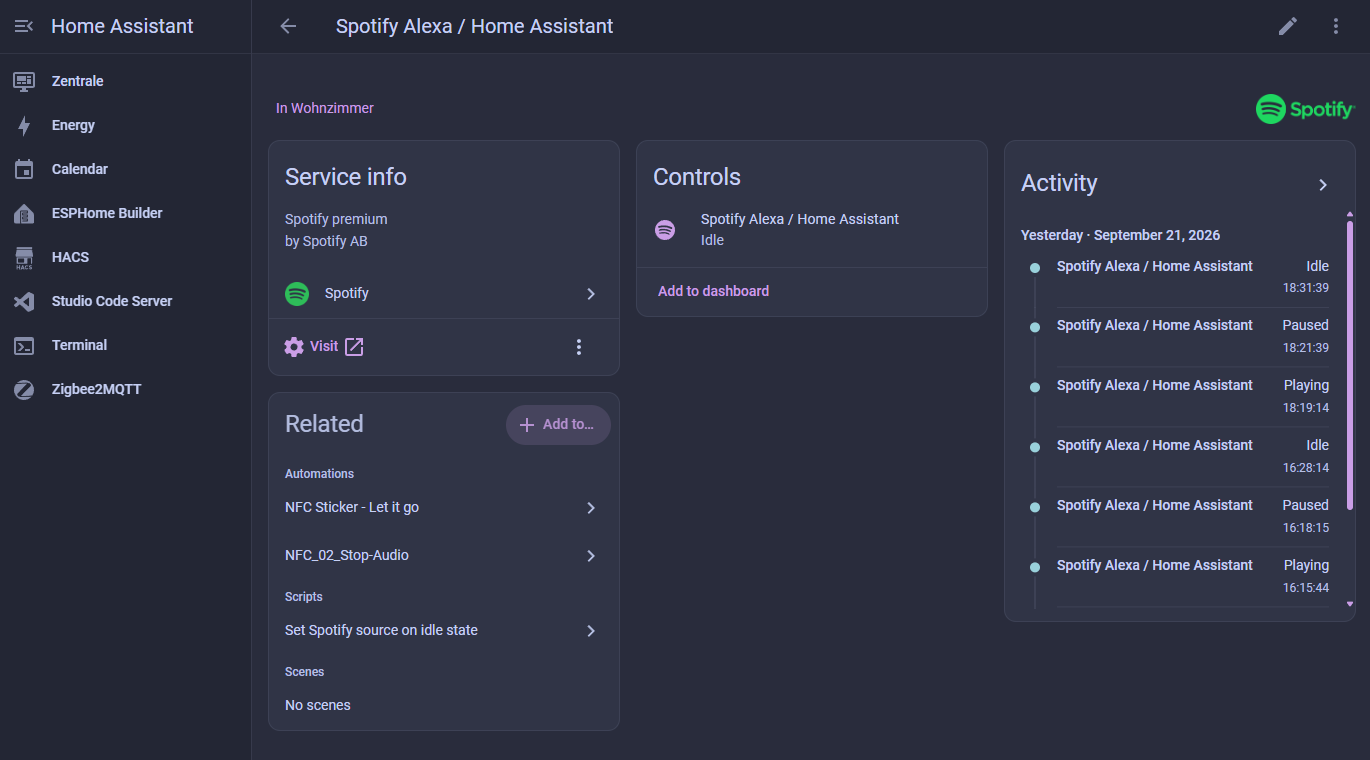
After setup, the integration should appear under Settings → Devices & services. Open it to check that Home Assistant shows the Spotify devices and the connected account.
Step 2: Store the script
Save the file as /config/spotify_play.py in the Home Assistant configuration directory and make it executable:
chmod 755 /config/spotify_play.py
The script reads the Spotify integration from /config/.storage/core.config_entries. Client credentials are stored in /config/.storage/application_credentials. The article names the locations only, never their contents. The script prints neither client secret nor token.
It normalizes a spotify: URI or an open.spotify.com URL, refreshes the OAuth token when needed, fetches /v1/me/player/devices, matches the device name case-insensitively and starts playback with PUT /v1/me/player/play.
#!/usr/bin/env python3
"""Start Spotify playback on a Spotify Connect device, by device name.

Why this exists: the Home Assistant Spotify integration only exposes
media_player.play_media while something is already playing
(see spotify/media_player.py, supported_features). This script performs the
initial start through the Web API, which works with nothing playing.

Called from Home Assistant via shell_command. Reuses the OAuth token that the
Spotify integration already stores, and refreshes it when expired. No secret
is ever printed.

Usage:
    python3 spotify_play.py --device "Wohnzimmer" --uri spotify:track:EXAMPLE
    python3 spotify_play.py --device "Küche" --uri https://open.spotify.com/track/EXAMPLE
"""
from __future__ import annotations

import argparse
import json
import os
import sys
import time
import urllib.error
import urllib.parse
import urllib.request

STORAGE = "/config/.storage"
TOKEN_URL = "https://accounts.spotify.com/api/token"
API = "https://api.spotify.com/v1"


def load(name):
    with open(os.path.join(STORAGE, name), encoding="utf-8") as fh:
        return json.load(fh)


def to_uri(value: str) -> str:
    """Accept a spotify: URI, an open.spotify.com link, or a bare id set."""
    v = value.strip()
    if v.startswith("spotify:"):
        return v
    if v.startswith("http"):
        parts = [p for p in urllib.parse.urlparse(v).path.split("/") if p]
        if len(parts) >= 2:
            return "spotify:%s:%s" % (parts[0], parts[1])
    return v


def access_token(entry: dict) -> str:
    token = entry["data"]["token"]
    if float(token.get("expires_at") or 0) > time.time() + 60:
        return token["access_token"]

    creds = load("application_credentials")["data"]["items"]
    impl = entry["data"].get("auth_implementation")
    cred = next((c for c in creds if c.get("id") == impl), creds[0])
    body = urllib.parse.urlencode({
        "grant_type": "refresh_token",
        "refresh_token": token["refresh_token"],
        "client_id": cred["client_id"],
        "client_secret": cred["client_secret"],
    }).encode()
    req = urllib.request.Request(
        TOKEN_URL, data=body,
        headers={"Content-Type": "application/x-www-form-urlencoded"})
    try:
        with urllib.request.urlopen(req, timeout=20) as resp:
            return json.loads(resp.read())["access_token"]
    except urllib.error.HTTPError as err:
        sys.exit("spotify: token refresh failed: %s %s"
                 % (err.code, err.read().decode("utf-8", "replace")[:160]))


def main() -> None:
    ap = argparse.ArgumentParser()
    ap.add_argument("--device", required=True, help="Spotify Connect device name")
    ap.add_argument("--uri", required=True, help="spotify: URI or open.spotify.com link")
    args = ap.parse_args()

    uri = to_uri(args.uri)
    entries = load("core.config_entries")["data"]["entries"]
    entry = next((e for e in entries if e.get("domain") == "spotify"), None)
    if entry is None:
        sys.exit("spotify: no spotify config entry found")

    token = access_token(entry)

    def api(method: str, path: str, payload=None):
        data = json.dumps(payload).encode() if payload is not None else None
        req = urllib.request.Request(
            API + path, data=data, method=method,
            headers={"Authorization": "Bearer " + token,
                     "Content-Type": "application/json"})
        try:
            with urllib.request.urlopen(req, timeout=25) as resp:
                raw = resp.read()
                return resp.status, (json.loads(raw) if raw else None)
        except urllib.error.HTTPError as err:
            return err.code, err.read().decode("utf-8", "replace")[:200]

    status, devices = api("GET", "/me/player/devices")
    if status != 200 or not isinstance(devices, dict):
        sys.exit("spotify: cannot read devices (%s): %s" % (status, devices))

    wanted = args.device.strip().casefold()
    available = devices.get("devices", [])
    device = next((d for d in available
                   if (d.get("name") or "").casefold() == wanted), None)
    if device is None:
        sys.exit("spotify: device '%s' not found (available: %s)"
                 % (args.device, ", ".join(d.get("name", "?") for d in available)))

    status, body = api("PUT", "/me/player/play?device_id=" + device["id"],
                       {"uris": [uri]})
    if status in (200, 204):
        print("spotify: started %s on %s" % (uri, device["name"]))
        return
    sys.exit("spotify: play failed (%s): %s" % (status, body))


if __name__ == "__main__":
    main()
Step 3: Configure shell_command
Add this to configuration.yaml:
shell_command:
  spotify_play: >-
    python3 /config/spotify_play.py
    --device "{{ device }}"
    --uri "{{ uri }}"
The two template variables are the interface between the automation and the script. device is the Spotify Connect device name; uri is a Spotify URI or URL. Check the configuration and reload or restart Home Assistant after editing.
Step 4: Add a target-device helper
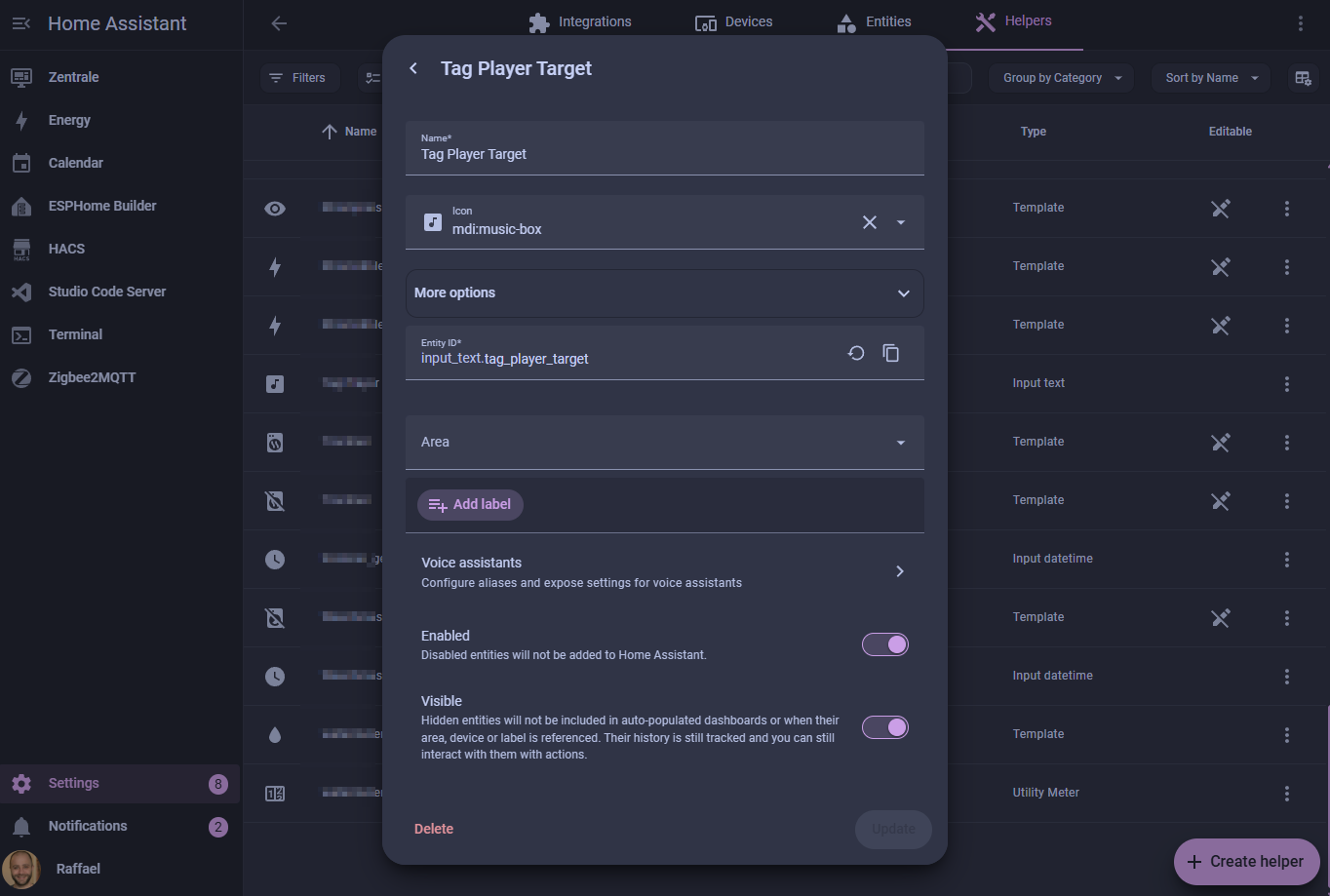
Create a text helper under Settings → Devices & services → Helpers. For this article it is input_text.tag_player_target. Store the name under which Spotify shows the Alexa, such as Living room or Kitchen.
This is not the Home Assistant entity name. Spotify Connect is the authority here. Matching ignores case, but the remaining spelling must be correct.
Step 5: Create the NFC automation
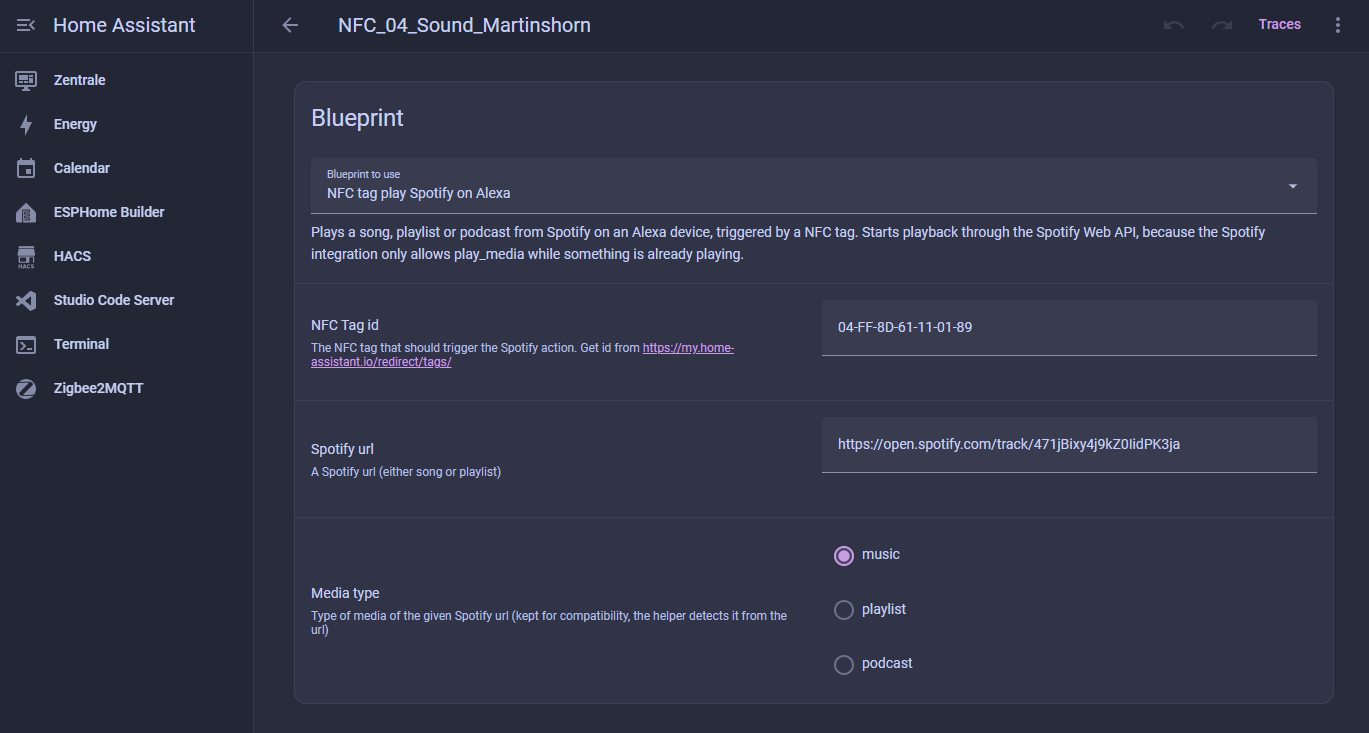
The existing blueprint accepts a tag ID, Spotify URL and media type. Media type remains for compatibility; the helper detects the type from the URI. Import the blueprint and create an automation from it:
blueprint:
  name: NFC tag play Spotify on Alexa
  description: >-
    Plays a song, playlist or podcast from Spotify on an Alexa device, triggered by a NFC tag.
    Starts playback through the Spotify Web API, because the Spotify integration only allows
    play_media while something is already playing.
  domain: automation
  input:
    tag_id:
      name: NFC Tag id
      description: The NFC tag that should trigger the Spotify action. Get id from https://my.home-assistant.io/redirect/tags/
      selector:
        text:
    media_url:
      name: Spotify url
      description: A Spotify URL for a song, playlist or podcast
      selector:
        text:
    media_type:
      name: Media type
      description: Type of the Spotify media. Kept for compatibility; the script accepts the URI directly.
      selector:
        select:
          options:
            - music
            - playlist
            - podcast
trigger:
  - platform: tag
    tag_id: !input tag_id
condition: []
action:
  - service: shell_command.spotify_play
    data:
      device: "{{ states('input_text.tag_player_target') }}"
      uri: !input media_url
mode: single
Select the NFC tag and enter a Spotify link. The current helper value is read whenever the tag is scanned.
Step 6: Test in order
- Confirm that Spotify is configured and the account has Premium.
- Start Spotify elsewhere and check that the Alexa appears as a Spotify Connect target.
- Set the helper to exactly that Spotify device name.
- Run the script manually inside the Home Assistant environment with a known URI.
- Test the automation separately: is the tag detected, and is
shell_command.spotify_playcalled? - Log shell-command output while testing. Otherwise errors are easy to miss.
Common failure modes
- Expired token: The script refreshes it, but a revoked refresh token requires reconnecting Spotify.
- Device not found: The helper contains a name different from Spotify Connect.
- Alexa unavailable: It is offline or not currently exposed by Spotify as a Connect device.
- No Premium account: Web API playback control requires Premium.
- No execute permission: Check the path, shebang and
chmod 755. - Silent failure: Enable logging so device and HTTP errors become visible.
Call the script from any automation
NFC is only my trigger. The important part is always the same: pass a device name and a Spotify URI to shell_command.spotify_play. Everything else can change.
Physical button
alias: Start Spotify in the living room with a button
description: Starts a fixed track on the device selected in the helper.
trigger:
  - platform: state
    entity_id: binary_sensor.living_room_button
    to: "on"
condition: []
action:
  - service: shell_command.spotify_play
    data:
      device: "{{ states('input_text.tag_player_target') }}"
      uri: "spotify:track:EXAMPLE_TRACK_ID"
mode: single
Schedule
alias: Start Spotify in the morning
description: Starts a weekday playlist on the selected device.
trigger:
  - platform: time
    at: "07:00:00"
condition:
  - condition: time
    weekday:
      - mon
      - tue
      - wed
      - thu
      - fri
action:
  - service: shell_command.spotify_play
    data:
      device: "{{ states('input_text.tag_player_target') }}"
      uri: "spotify:playlist:EXAMPLE_PLAYLIST_ID"
mode: single
Presence
alias: Start Spotify when someone arrives
description: Starts a podcast when a person gets home.
trigger:
  - platform: state
    entity_id: person.example
    from: "not_home"
    to: "home"
condition: []
action:
  - service: shell_command.spotify_play
    data:
      device: "{{ states('input_text.tag_player_target') }}"
      uri: "spotify:episode:EXAMPLE_EPISODE_ID"
mode: single
Voice command or another Home Assistant script
alias: Start Spotify by voice command
description: This script contains only the actual call.
sequence:
  - service: shell_command.spotify_play
    data:
      device: "{{ states('input_text.tag_player_target') }}"
      uri: "spotify:track:EXAMPLE_TRACK_ID"
mode: single
Replace the example IDs and entity names. The trigger can be NFC, a button, a schedule, presence or a voice command. The Alexa selection logic stays the same.
Conclusion
This setup starts a song, playlist or podcast from a cold state on a selectable Alexa, as long as the device is reachable through Spotify Connect and the account has Premium. The helper contains the Spotify device name, not a hard-coded Home Assistant entity.
The trade-off is small: one Python script, access to the stored OAuth data and a little attention when debugging. In return there is no second Spotify login or extra service. For my NFC use case that is enough: tap the card and the music starts, without a screen, phone or automation rewrite.